

If you’ve already used a Nigerian bank card for everyday payments, you’ve probably discovered that some international websites, subscriptions, and digital services require a different payment option. At the same time, many first-time users miss important details such as balance priority, billing address, fees, and card verification; in this guide, we’ll show you how to create a Raenest Virtual Visa Card in Nigeria, find your details, make your first payment, and avoid common problems.
What you will learn if you can follow till the end
- The Raenest Virtual Visa Card is a Visa-powered virtual USD card connected to eligible Raenest balances for online and supported contactless payments.
- A verified Raenest account is required before you can create the virtual card, and Nigeria is currently a supported country.
- The current card creation fee is $3 once, while Raenest lists monthly maintenance and card-funding fees as free.
- The card does not need separate funding because eligible payments are deducted directly from your linked Raenest balances according to your selected spending priority.
- The card supports eligible online purchases and supported contactless payments, including Apple Pay and Google Pay.
- Spending limits depend on KYC level, ranging from up to $7,000 daily at Level 1 to $20,000 daily at Level 5.
- Checking your balance, billing address, merchant acceptance, and current fees before paying can reduce avoidable declines and unexpected charges.
What Is a Raenest Virtual Visa Card and How Does It Work?
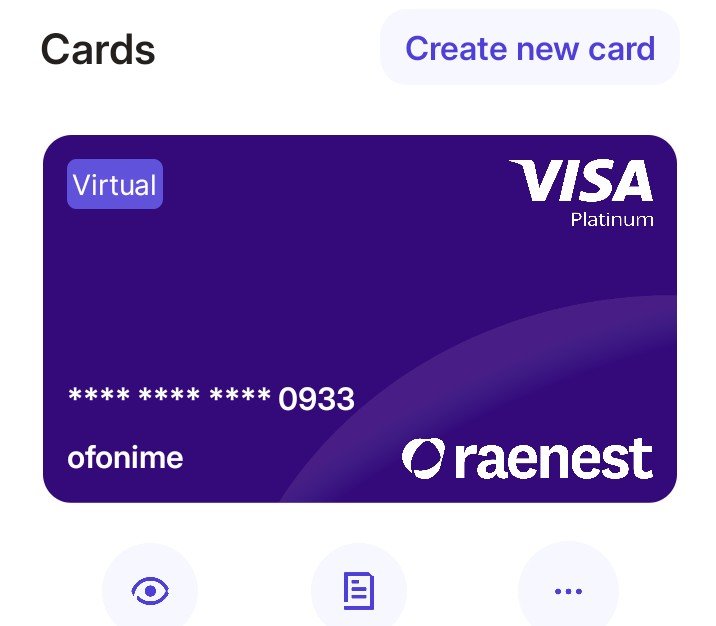
Raenest Virtual Visa Card is a Visa-powered virtual USD card that lets eligible Raenest users make online and supported contactless payments using their linked Raenest balances. Unlike a physical debit card, it exists digitally inside your Raenest account and provides card details such as the card number, expiry date, CVV, and cardholder name.
For example, instead of waiting for a physical dollar card to Drive you crazy because i am 100% you will go through hell in nigeria , you can create the virtual card in the Raenest app and use its details at an eligible online checkout.
At the same time, the current Raenest card is linked directly to your balances rather than requiring a separate prepaid card wallet. For example, if your selected priority is USD first, GBP second, EUR third, and NGN last, Raenest checks those eligible balances in that order when processing a payment.
Moreover, the new Raenest card is powered by Visa and is marketed by Raenest as being usable across more than 150 million merchants where Visa is accepted. — Source: Raenest, 2026.
virtual dollar card vs physical dollar card
Why Does a Raenest Virtual Visa Card Matter for Nigerians?
Second, a Raenest Virtual Visa Card matters because it gives eligible Nigerian users another way to make legitimate international online payments from a multi-currency account. For example, a freelancer may use it to pay for software, while a creator may use it for an eligible subscription or advertising expense.
In addition, Nigeria has a large and growing digital-payment ecosystem, making convenient online payment methods increasingly important. CBN data for January–June 2024 recorded 11,638,142,074 internet transactions valued at ₦825.50 trillion. — Source: Central Bank of Nigeria, 2024.
For example, common use cases can include:
- Online shopping on eligible international websites
- Software and SaaS subscriptions
- Business and advertising expenses
- Travel bookings and related purchases
- Eligible digital services and recurring payments
- Contactless payments through supported digital wallets
That being said, Visa acceptance does not guarantee that every merchant or transaction type will work. Raenest also lists certain restricted categories and countries, so a transaction can still be declined even when a merchant displays the Visa logo.
best virtual dollar cards in Nigeria
how to pay for international subscriptions from Nigeria
Who Can Create a Raenest Virtual Visa Card in Nigeria?
If you are a Nigerian user create a Raenest Virtual Visa Card after opening a supported Raenest account and completing the required verification. Nigeria is currently listed by Raenest among the countries where users can create virtual cards.
Raenest’s current onboarding information says Nigerian users need to provide relevant identity information and verify their account before accessing the full set of services.
Furthermore, Raenest’s 2026 documentation lists accepted Nigerian identity documents including an international passport, National Identity Card/NIN, and driver’s licence. Raenest also says Nigerian users are asked to verify their BVN during account setup.
What Do You Need to Create a Raenest Virtual Visa Card?
Every user need a verified Raenest account, access to eligible Raenest balances, and enough money to cover the card creation fee. Raenest currently lists a one-time $3 creation fee, while the card itself does not need separate funding before purchases.
before starting, make sure your identity verification is complete, your account is active, and you have an eligible balance available for the applicable fee.
Moreover, your KYC level affects how much you can spend after the card is created. Raenest currently lists five card-spending KYC levels, with Level 1 allowing up to $7,000 per day and $21,000 per month, while Level 5 allows up to $20,000 per day and $60,000 per month. — Source: Raenest, 2026.
How Do You Create a Raenest Virtual Visa Card Step by Step?
Creating a Raenest Virtual Visa Card involves opening the Raenest app, selecting Cards, choosing Create Card, naming the card, setting the preferred balance priority, and paying the applicable card creation fee. Raenest says the card becomes ready to use once created.
Step 1: Log In to Your Raenest Account
Open the official Raenest app and sign in to your account. For example, use the same verified account you completed during onboarding rather than creating another account just to access the card.
Step 2: Open Cards
Next, tap Cards from the Raenest dashboard. This section is where you manage your virtual card and later access details such as the card number, expiry date, CVV, billing address, and transaction history.
Step 3: Tap “Create Card”
Then, select Create Card to begin the virtual-card setup process. For example, if the option is missing, check whether your verification has been completed and whether your account is eligible.
Step 4: Name Your Card
After that, enter a name for your card. For example, you might use Business Payments or Online Subscriptions so the card is easy to identify inside your account.
Step 5: Set Your Balance Priority
Next, choose the order in which Raenest should use your available balances. For example, you could set USD → GBP → EUR → NGN, causing Raenest to check each eligible balance in that order when making a payment.
Step 6: Pay the Card Creation Fee
Then, pay the current $3 one-time card creation fee. Raenest’s July 2026 fee documentation lists the fee as one-time rather than monthly. — Source: Raenest, 2026.
Step 7: Start Using the Card
Finally, your virtual card is ready to use once creation is completed. Raenest says you can use it for eligible online payments and add it to Apple Pay or Google Pay for supported contactless transactions.
Raenest app showing Cards and Create Card workflow
How Do You Find Your Raenest Card Number, CVV and Expiry Date?
First, your Raenest card number, expiry date, CVV, and cardholder name are available from the Cards section of the Raenest app. For example, when an online store asks for card credentials, you can open the card and retrieve the required details there.
At the same time, treat your card details like sensitive financial information. Never post your full card number or CVV publicly, and avoid sending screenshots of the complete card details through unsecured chats.
[Insert image: Raenest virtual card screen with card details concealed for privacy | Alt text: “Find Raenest card number and CVV in the app”]
How Do You Find Your Raenest Virtual Card Billing Address?
Now, your Raenest Virtual Visa Card billing address is available from the Cards section under Billing Address information. For example, Raenest says users may see both a U.S. billing address and a home-country billing address, with the correct postal code shown in the app.
Moreover, the billing address matters because some merchants use it for address verification during checkout. For example, entering the wrong postal code can cause an otherwise valid card payment to fail.
Raenest Cards page showing Billing Address option
How Do You Make Your First Payment With the Raenest Virtual Visa Card?
First, you make an online payment by selecting the card or Visa payment option and entering your Raenest card details at checkout. For example, a software website may ask for your card number, expiry date, CVV, cardholder name, and billing information before processing the payment.
Next, follow this sequence:
- Select Visa/card payment at checkout.
- Enter your card number.
- Enter the expiry date.
- Enter the CVV.
- Enter the cardholder name.
- Add the requested billing address and postal code.
- Complete any 3D Secure, OTP, or merchant authentication prompt.
- Confirm that the payment amount is correct.
At the same time, remember that your payment comes from your linked Raenest balances according to your spending priority rather than from a separately funded card wallet.
how to pay for international software from Nigeria
How Much Does a Raenest Virtual Visa Card Cost?
Second, Raenest’s current July 2026 fee documentation lists a $3 one-time card creation fee, a $0.70 fee per successful card transaction, and a possible 2% + $0.40 international merchant processing fee in specified cases. Raenest also lists card funding, maintenance, and monthly fees as free.
Card cost or charge| Current Raenest information
Create virtual USD card| $3 one-time
Successful card transaction| $0.70
Card funding| Free
Monthly maintenance| Free
Card maintenance| Free
International merchant processing| 2% + $0.40 where applicable
Insufficient-balance decline| $0.40
Chargeback/dispute processing| $50
Currency conversion| Applies when funded from a non-USD wallet
— Source: Raenest, 2026.
For example, a successful transaction can therefore involve more than the purchase price itself, especially where cross-border processing or currency conversion applies.
That being said, fees can change, so check Raenest’s current card-fee page immediately before making a significant payment.
Do You Need to Fund Your Raenest Virtual Card Before Using It?
First, you do not need to separately fund the Raenest Virtual Visa Card before making a payment because the card spends directly from your linked Raenest balances. For example, if USD has enough money and USD is your first priority, the payment can be taken directly from that balance.
Moreover, if the first balance does not contain enough money, Raenest can move through your selected priority order and check the next eligible balance. If no eligible balance can cover the payment, the transaction can be declined.
What Are the Raenest Virtual Card Spending Limits?
Second, Raenest virtual-card spending limits are determined by your KYC verification level. Raenest’s current 2026 limits are:
KYC level| Daily limit| Monthly limit
Level 1| $7,000| $21,000
Level 2| $10,000| $25,000
Level 3| $12,000| $36,000
Level 4| $15,000| $45,000
Level 5| $20,000| $60,000
Another thing to keep in mind, reaching a higher KYC level can increase the maximum amount you are permitted to spend, but your actual usable balance may still be much lower.
Where Can You Use a Raenest Virtual Visa Card?
You can use the Raenest Virtual Visa Card for eligible online purchases, subscriptions, travel-related spending, business expenses, and supported contactless payments where Visa and Raenest permit the transaction.
Raenest specifically describes use cases including software subscriptions, online shopping, travel, advertising, and business tools.
In addition, Raenest’s current documentation says the card can be added to Apple Pay and Google Pay for supporhhted contactless transactions.
Can You Add a Raenest Virtual Visa Card to Apple Pay or Google Pay?
you can add the Raenest Virtual Visa Card to Apple Pay or Google Pay when the feature and transaction are supported. For example, a compatible device can authenticate a contactless payment using Face ID, Touch ID, or a device passcode.
Moreover, Raenest describes contactless payments as a supported feature of its new Visa card, particularly for spending abroad. — Source: Raenest, 2026.
Add Raenest Visa card to Apple Pay or Google Pay
Why Is My Raenest Virtual Card Payment Declined?
A Raenest Virtual Visa Card payment can be declined because of insufficient balances, incorrect details, billing-address errors, spending limits, technical problems, restrictions, or a frozen card.
For example, an insufficient-balance decline currently carries a $0.40 fee, according to Raenest’s July 2026 card-fee documentation. — Source: Raenest, 2026.
First, check these items before trying again:
- Your available USD, GBP, EUR, and other eligible balances
- Your card number, expiry date, and CVV
- The correct billing address and postal code
- Your daily and monthly spending limits
- Whether the card is frozen
- Whether the merchant or country is restricted
- Whether an additional verification prompt was completed
At the same time, do not repeatedly retry a transaction when you cannot identify the problem; contact Raenest support through the app when the issue continues.
online payment security tips for Nigerians
How Do You Freeze or Terminate a Raenest Virtual Visa Card?
You can freeze or unfreeze your Raenest Virtual Visa Card from the Cards section of the app, while termination permanently closes the current card. For example, freezing is useful when you suspect someone may have obtained your card details but you are still investigating the issue.
Moreover, Raenest says a terminated card cannot be reactivated, although you can create a new virtual card afterward. Raenest also states that individual users can have only one active virtual card at a time. — Source: Raenest, 2026.
Is the Raenest Virtual Visa Card Safe for Online Payments?
The Raenest Virtual Visa Card uses security features including 3D Secure authentication and in-app card controls to help protect eligible transactions. For example, you can freeze the card from the app if you suspect that your card information has been compromised.
In addition, Nigeria’s digital-payment environment continues to expand, with the CBN reporting more than 12 million contactless payment cards in circulation in 2025. — Source: Central Bank of Nigeria, 2025.
That being said, no payment card removes the need for safe online habits. Never share your CVV unnecessarily, verify the merchant domain before paying, and monitor your transaction history regularly.
Practical Raenest Virtual Card Setup and First-Payment Checklist
First, the easiest way to use the card successfully is to verify the setup before attempting a major purchase. For example, checking your balance, billing details, priority order, and card status takes less time than troubleshooting a failed transaction afterward.
For a visual guide, use this checklist:
- Account: Verify your Raenest account and identity.
- Card: Confirm the virtual Visa card is active.
- Balance: Make sure enough eligible funds are available.
- Priority: Check which wallet will be used first.
- Details: Confirm card number, CVV, and expiry date.
- Billing: Copy the correct billing address and postal code.
- Fees: Review the latest Raenest card-fee schedule.
- Merchant: Confirm the website accepts Visa and your transaction type.
- Security: Keep 3D Secure and other authentication steps available.
At the same time, NIBSS reported that its new National Payment Stack recorded 26.55 million transactions worth about ₦1.4 trillion across 48 participating institutions during its rollout in 2026. — Source: NIBSS, 2026.
What’s Next After Creating Your Raenest Virtual Visa Card?
First, your next step after card creation should be to verify the card settings and make a legitimate, affordable test payment rather than immediately making a large purchase. For example, a small subscription or low-value online transaction can help you confirm that your billing details and balance priority are configured correctly.
Next, monitor the transaction in the Raenest app and review the final amount charged. Raenest provides transaction history within the Cards section, which makes it easier to track card activity.
Moreover, save the current fee schedule before budgeting for repeated international purchases, especially when you regularly use non-USD balances or international merchants.
how to receive money from abroad in Nigeria
Conclusion: Start Using Your Raenest Virtual Visa Card With Confidence
First, creating a Raenest Virtual Visa Card in Nigeria is a straightforward process: verify your account, open Cards, choose Create Card, name the card, set your balance priority, pay the $3 creation fee, and start using the card.
Finally, remember that the card does not require separate funding, but successful payments still depend on sufficient eligible balances, correct billing information, merchant acceptance, KYC limits, and applicable fees.
Most importantly, check Raenest’s latest fee and usage documentation before making an important payment, because financial-product features and charges can change over time.
Written by: Peterson — Digital Banking and Virtual Payments Writer, with 6+ years of experience across virtual banking and physical banking.
Reviewed by: Peterson — Banking and Digital Payments Subject Matter Reviewer.